
Every table setting, in one module
Divi Table Extended is a purpose-built table module for Divi 5 that gives you full control over how tabular data looks, behaves, and performs. CSS Grid architecture, real accessibility, and a complete set of design controls.
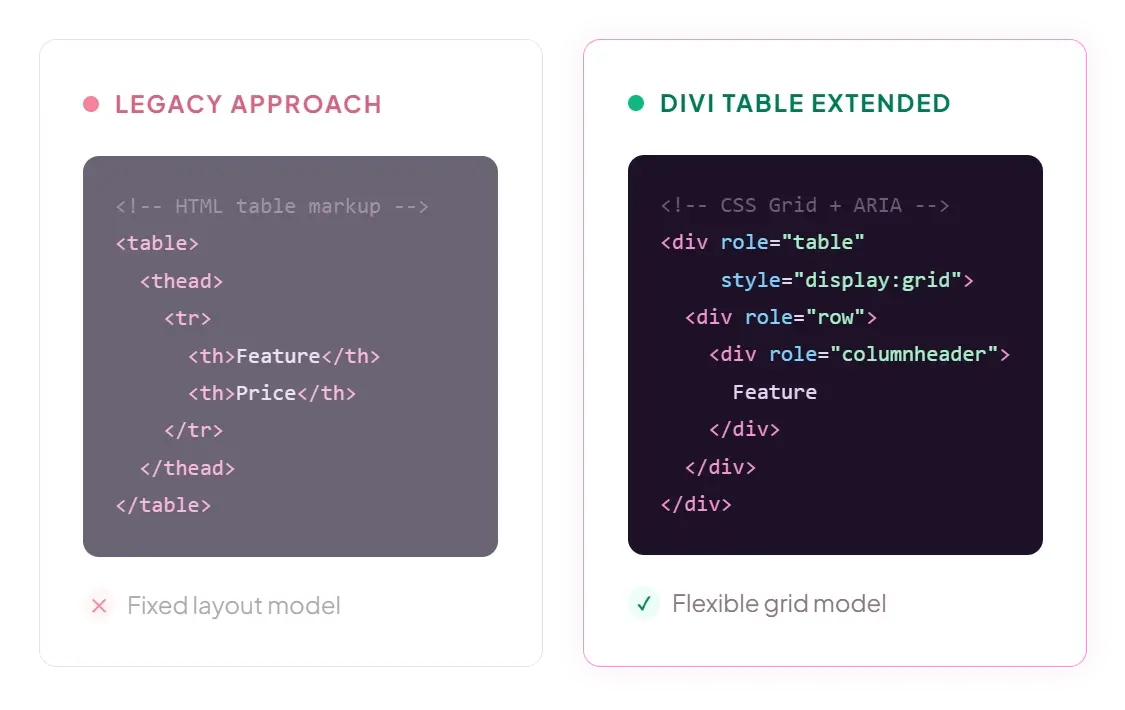
CSS Grid, not HTML tables
Each cell item has a column span and row span slider (1 to 100). Merge cells horizontally, vertically, or both.
Faster rendering
CSS Grid calculates layout in a single pass. Legacy tables need multiple passes to resolve column widths across rows.
Flexible layouts
Column widths, spanning, and alignment are controlled with grid properties. No workarounds for merged cells or uneven columns.
Accessibility-first markup
Proper ARIA roles (table, row, columnheader, rowheader, cell) are applied throughout, so tables remain usable with screen readers.
Clean responsive behavior
Grid-based markup restructures without fighting browser table-layout defaults. Accordion and block modes reflow without hacks.
What you can build
Each feature is a setting in the module panel. No shortcodes, no custom CSS, no code editing needed.
1
What you can build
Build tables with any combination of headers, footers, and content cells. Column-based, row-based, or both. Cells can span multiple columns and rows for grouped headers, merged sections, and multi-level footers.
- Set header columns, header rows, and footer rows with range sliders
- Column span and row span controls on every cell (1 to 100)
- Empty header cells for alignment control
- The underlying grid stays clean and predictable
Product overview
Price
Region A
Widget
WDG-01
$49
Gadget
GDG-02
$79
Region B
Tool Pro
TLP-03
$129
Column footer (3 items)
$257
#
Country
Population
1
United States
331.9M
2
China
1.41B
3
Japan
125.7M
4
Germany
83.2M
5
India
1.42B
6
United Kingdom
67.7M
7
France
67.4M
8
Brazil
214.3M
9
Italy
59.1M
10
Canada
38.9M
11
South Korea
51.7M
12
Australia
26.0M
13
Spain
47.4M
2
Mexico
128.9M
14
Indonesia
275.5M
2
Sticky headers and scrolling
Keep context visible in long or wide tables with sticky column headers or sticky row headers. Sticky positioning is calculated dynamically so it stays accurate even with row-spanning cells or multi-level header stacks.
- Pin column headers for vertical scroll
- Pin row headers for horizontal scroll
- Set max height for the table container
- Headers stay pinned without visual glitches
3
Alternating stripes
Apply alternating stripes horizontally or vertically to improve readability across large datasets, with full control over stripe color and pattern.
- Horizontal stripes: alternating row backgrounds
- Vertical stripes: alternating column backgrounds
- Set separate odd and even background colors
- Works alongside all other table features
Metric
Q1
Q2
Q3
Revenue
$1.2M
$1.5M
$1.8M
Expenses
$0.8M
$0.9M
$1.0M
Profit
$0.4M
$0.6M
$0.8M
Growth
12%
18%
24%
Customers
Customers
1,240
1,580
Churn
3.2%
2.8%
2.1%
Specification
Standard
Professional
Processor
The CPU that handles all main computations
Intel i5
Intel i9
Memory
DDR5 RAM for multitasking and workload capacity
16 GB
64 GB
Storage
NVMe SSD with read speeds up to 7,000 MB/s
512 GB
2 TB
GPU
Dedicated graphics for rendering and 3D workloads
RTX 4060
RTX 4090
4
Tooltips on any cell
Add contextual tooltips to individual cells with configurable trigger behavior, animation, duration, sizing, and breakpoint-aware placement. Useful for footnotes, definitions, or supplementary detail without cluttering the table itself.
- Configurable animations for entrance and exit
- Trigger on hover or click
- Place top, bottom, left, right, or auto
- Custom sizing and duration per tooltip
Built for real-world use
Accessibility support and performance are part of the architecture, not an afterthought.
Accessibility-first markup
Proper ARIA roles are applied throughout, so tables remain usable with screen readers and assistive technology. Every element gets the correct semantic role.
role="table"
role="rowgroup"
role="row"
role="columnheader"
role="rowheader"
role="cell"
Performance-minded architecture
Tables are built to stay lightweight and cache-friendly. Dynamic behavior (sticky positioning, responsive breakpoints) is handled with care so it works cleanly alongside caching and performance plugins.
CSS-only sticky
No heavy JS
Cache-safe
Grid layout
Every table setting, in one module
One Divi 5 module with a child item for each cell. All controls below are in the module settings panel.
Column headers
Set the number of header columns with a range slider. Style them independently from content cells.
Row headers
Set the number of header rows. Apply separate background, font, and border styles to row headers.
Footer rows
Add footer rows for totals, CTAs, or summary data. Style footers independently from headers and content.
Column span
Every cell has a column span slider (1 to 100). Merge cells horizontally for grouped headers or wide content.
Row span
Every cell has a row span slider (1 to 100). Merge cells vertically for multi-row labels or grouped regions.
Sticky column headers
Pin the top header row while scrolling vertically. Set a max height for the table container.
Sticky row headers
Pin the first column while scrolling horizontally. Dynamic calculation handles multi-level headers.
Accordion mode
On mobile, each row collapses into a tappable accordion panel with all column values inside.
Block mode
On mobile, each column becomes a stacked card with the header as the card title and values listed below.
Horizontal stripes
Alternate row backgrounds for readability. Set separate odd and even colors.
Vertical stripes
Alternate column backgrounds for readability. Set separate odd and even colors.
Tooltips
Attach a tooltip to any cell. Configurable animation, trigger, placement, duration, and sizing.
Cell background colors
Set background color per cell, per region, or table-wide. Gradient and solid options available.
Typography controls
Font family, size, weight, style, color, line height, and letter spacing for each cell region.
Cell padding
Set padding independently for each side. Apply to individual cells or all cells in a region.
Border styles
Border width, color, and style per cell or per region. Choose gapped or lined frame styles.
Corner rounding
Border radius per cell or for the entire table card. Match your site's design system.
Box shadows
Apply box shadows to the table container or individual cells. Multiple shadow layers supported.
Text alignment
Horizontal and vertical text alignment per region: left, center, right, top, middle, bottom.
Rich text editor
Each cell's description field supports the full Divi rich text editor with formatting controls.
Images with alt text
Upload images per cell with proper alt text for accessibility. Images resize within the cell.
Cell icons
Pick an icon for any cell from the Divi icon library. Size and color are controlled per cell.
View counter
Track table views with a built-in counter. Displayed in the settings panel for each table.
ARIA roles
Semantic ARIA roles applied to every element: table, row, columnheader, rowheader, cell.
Built for professionals
Agencies and freelancers
Building client sites in Divi 5 who need table functionality beyond what's built into the theme. Pricing pages, spec sheets, and comparison charts without custom code.
Developers
Who need a reliable, accessible table component for pricing pages, spec sheets, comparison charts, and data displays. CSS Grid architecture means clean, predictable markup.
Site owners
Who want table content that reads clearly on every device, without manual breakpoint tweaking. Set the responsive mode once and the table handles the rest.